

Getting Started SUCCESSFULLY with New Era
Read about the company behind New Era… DE SHAW & CO
Please complete all steps: GG 05/04/2026 Rev. E
Action Step
1. Attend a Live Presentation via Zoom (get the information on the What’s App and Telegram Groups) or watch this recording
Coach Dana Johnson’s Personal Meeting Room – Zoom
Need Passcode to View : L+Wg4dr&
2nd Webinar to watch…. from Sunday, April 26, 2026
www.debt2wealthnow.com
2. Decide how much you are going to put In and acquire the Cryptocurrency. Minimum is $500. The following Crypto Currencies are accepted:
USDT-ERC20
USDT-TRC20
USDT-BEP20
USDC-ERC20
USDC-BEP20
ETH, and BTC
NOTE: When depositing anything other than USDT, you will need to first do a Swap to USDT before entering Trade.
3. Get your Sponsor’s Link and sign up.
After registration log into this site. https://www.newerain.com
3. Complete KYC – KYC is required to do a withdrawal.
If your KYC was not done during registration, Log into your account, click on person icon at top left corner and scroll down and click on KYC Authentication.
For KYC, You will need to take a photo of the front and back of your Driver’s License. You will also need to take a selfie photo of you holding your Driver’s License. You will upload these photos during the registration process.
5. Join the What’s App Group. Ask your sponsor to include you.
6. After you fund your wallet, Please go to Telegram and send a message to Laura Masia with thisTelegram Handle: @LauraMasia00012
Send the following information
Your Name, your UID#, phone #, email address, how much you funded your wallet, and your time zone.
Your UID (User ID) can be found in your backoffice of the App. Click on the “Head” ICON on the upper left hand side.
7. You can login to trade online here: https://www.newerawe.com/wap/#/userCenter
and you can download the App from your back office.
Click on person icon at top left corner and scroll down and click on Download App and scan the QR code.
Or Download the NewEra App for trading on the website www.newerain.com and click on “Download APP.” or
This is what the app looks like → 
8. To TRADE, open the app, Click on the Trade Symbol at the bottom of your screen. 3 Easy Steps
1. A photo of a Bitcoin will pop up with the word “CONFIRM”below it and tap on it.
2. On the next window, tap on “Confirm Copy Trade”, another window will pop up, and
3. Click on “Confirm”. That’s it! Make sure to set your alarm for the next trade.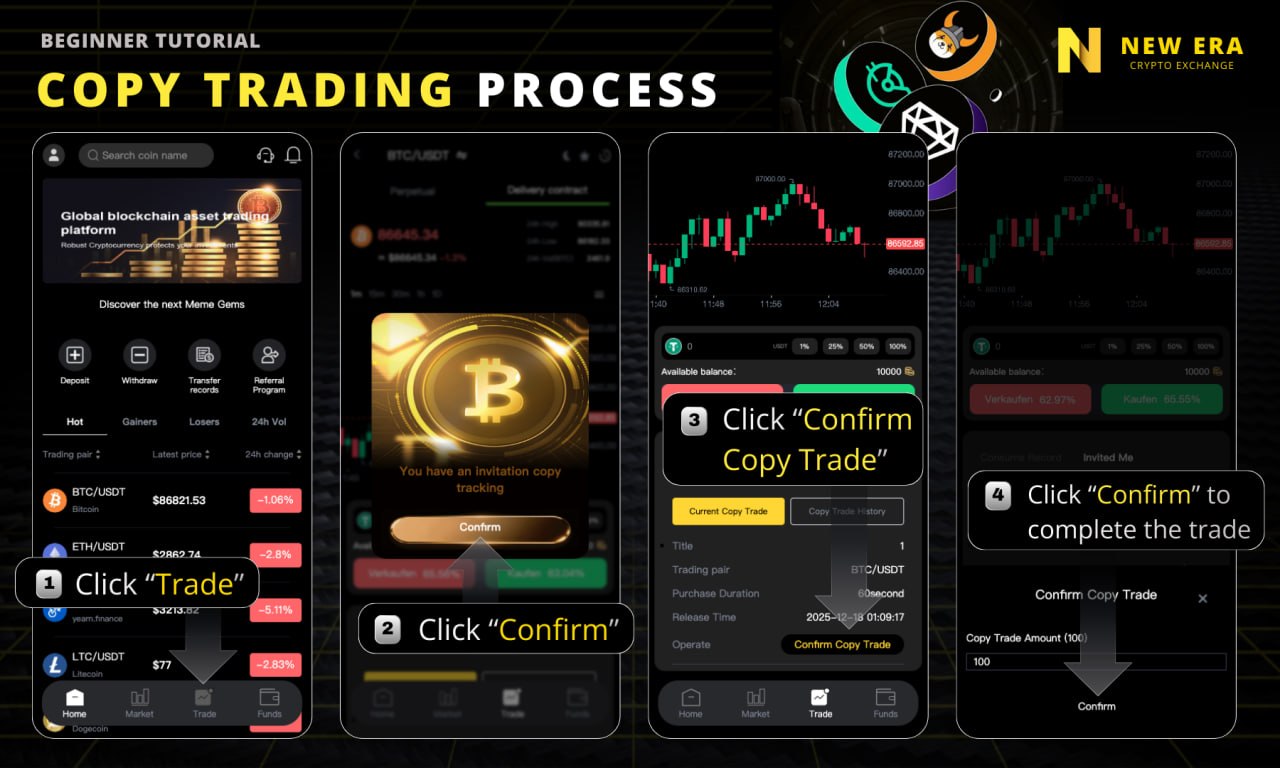
Trading Times Schedule Below:
Regular Trades
1st signal Starts upon sign-up 12pm PST 3pm EST
2nd signal Starts upon sign-up 2pm PST 5pm EST
3rd signal Starts upon sign-up 4pm PST 7pm EST
3 daily Signals = 1.8% (Everyone gets 3 trades)
4th signal – Get this signal when you bring in your first 2 people at $500. No time limit to get your 2 people.
4th Signal 6pm PST 9pm EST
4 daily Signals = 2.5% (Requires qualification)
5th signal Get this signal when you bring in 2 more people at $1000 Each, within 24 hours. This offer only good until May 16, 2026
6:30pm PST 9:30pm EST 5 daily Signals = 3.28% (Requires qualification)
7. Here is the compound calculator! Study it, Understand it, and Use it to make your plan! Have fun!
https://www.thecalculatorsite.com/finance/calculators/daily-compound-interest.php